
On this page7
- What Schema Markup Actually Does for Local Businesses
- The Specific Schema Types That Matter Most for Local SEO
- How to Build and Deploy Local Schema Markup Step by Step
- Schema Markup Methods Compared: Manual vs Plugin vs GTM
- The Most Damaging Schema Mistakes Local Businesses Make
- Final Thoughts
- Frequently Asked Questions
Most local businesses spend money on ads and social media while ignoring a free technical signal that directly influences how Google displays their business in search results. Schema markup is structured data code that tells search engines exactly what your business is, where it is, and what it offers. It removes the guesswork from Google and replaces it with verified, machine-readable information your competitors are likely not providing.
Businesses with properly implemented LocalBusiness schema see measurably higher click-through rates. Star ratings, opening hours, and phone numbers appear directly in search results before a user even clicks. This guide covers the specific schema types that matter for local SEO, how to build and deploy them step by step, which tools to use, and the mistakes that quietly kill performance.
Read More On SXO Guide: Boost Rankings & User Experience in 2026
What Schema Markup Actually Does for Local Businesses
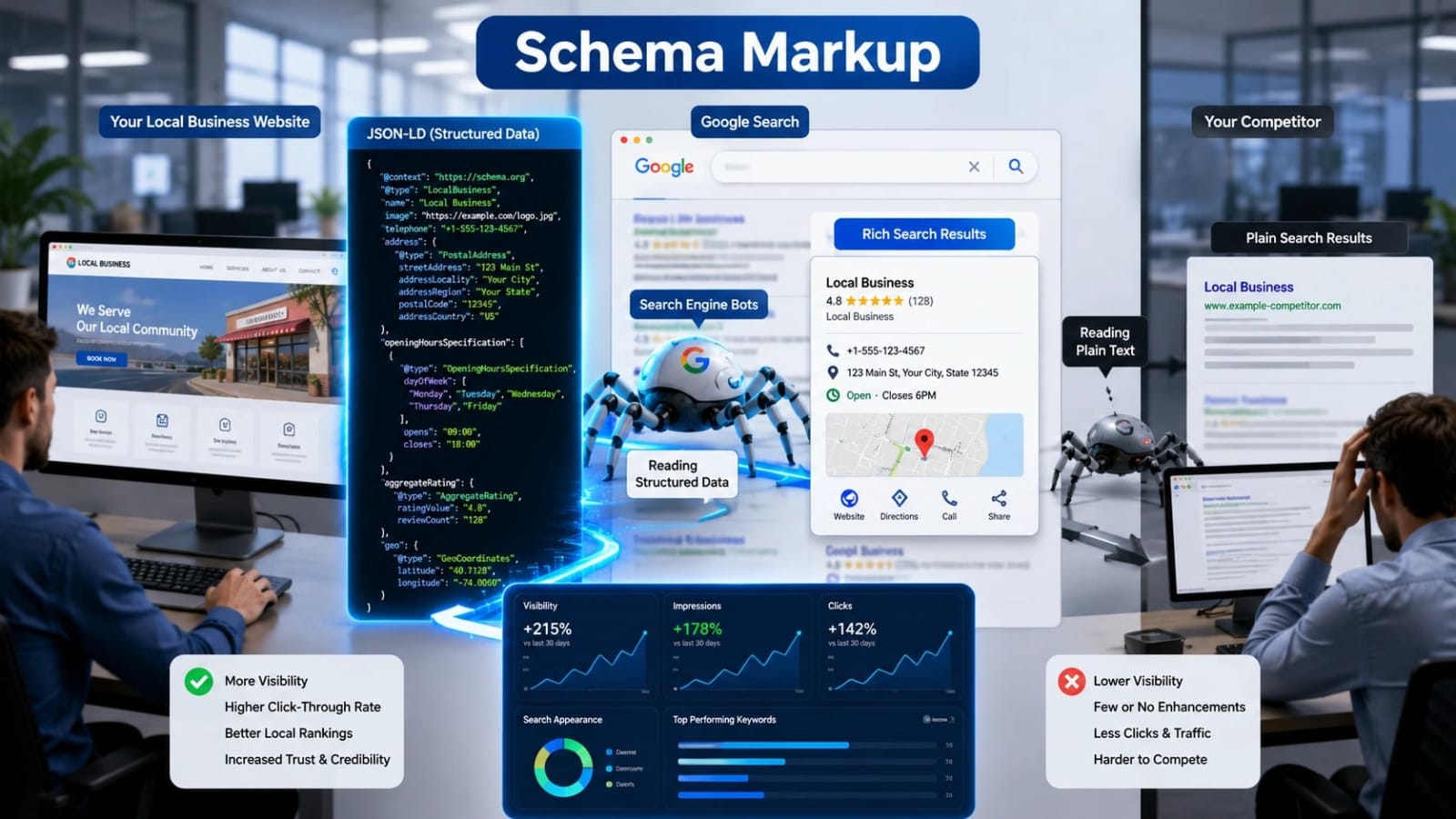
Schema markup does not directly boost rankings in the traditional sense. It gives Google verified, machine-readable context that increases the likelihood of rich results and knowledge panel visibility. For local businesses, this translates into address, phone number, hours, and reviews appearing inside the search result before a user even clicks a single link.
Google’s local algorithm weighs relevance, proximity, and prominence. Schema markup supports relevance and prominence signals directly. Without schema, Google infers business information from unstructured page text. That process increases the risk of incorrect data appearing in results, which damages both user trust and click-through performance.
How Rich Results Differ from Standard Organic Listings
A standard organic result shows a title, URL, and meta description. A rich result can also display star ratings, price range, hours of operation, and review count. Rich results occupy more vertical space in SERPs. That extra space pushes competitor results lower without requiring a higher ranking position.
Google’s own Search Central documentation confirms that rich results consistently drive higher engagement than plain blue links. Consider a practical example. A plumber in Austin with LocalBusiness schema showing “4.8 stars, Open Now, (512) 000-0000” will almost always outperform a competitor with no rich result, even when both rank at the same position.
How Schema Markup Connects to Google’s Local Pack
The Local Pack pulls primarily from Google Business Profile. However, schema markup on your website reinforces the NAP data Google already has. Consistent schema data that matches your Google Business Profile reduces entity confusion. Google becomes more confident that your website and your GBP listing represent the same real-world business.
Schema markup on location pages is particularly useful for multi-location businesses where Google needs to distinguish between branches. Businesses that keep schema data perfectly aligned with their GBP listing have a structural advantage in Local Pack rankings. Any inconsistency between the two creates a signal conflict Google will resolve conservatively, often by suppressing rich results entirely.
Read More On SEO Tasks: The Complete Checklist for Building Rankings That Last
The Specific Schema Types That Matter Most for Local SEO
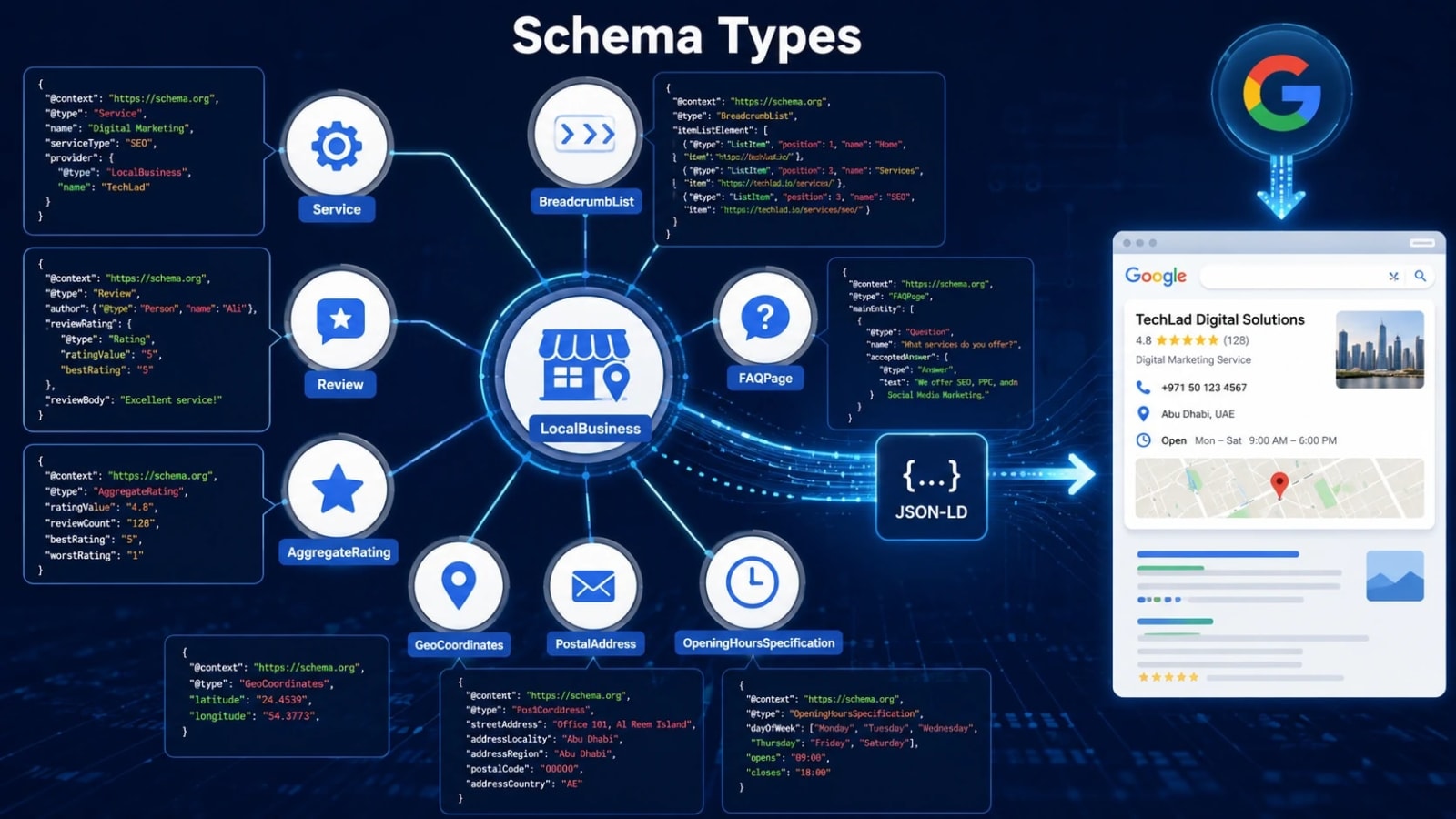
Not all schema types carry equal weight for local businesses. Prioritizing the right types prevents wasted implementation effort. The core schema types every local business should implement include LocalBusiness (or its specific subtype), BreadcrumbList, FAQPage, Review with AggregateRating, and WebPage.
Here are the high-priority local schema types and what each one does:
- LocalBusiness: The foundational type covering address, phone, hours, geo coordinates, and business category.
- Place: Used when the physical location itself is the primary entity, such as restaurants, venues, or parks.
- Service: Describes individual services offered, which helps Google match service-based queries to the right page.
- Review and AggregateRating: Displays star ratings in SERPs and reinforces social proof within search results.
- OpeningHoursSpecification: A nested property inside LocalBusiness that explicitly defines hours per day of the week.
- GeoCoordinates: Latitude and longitude values that eliminate any geographic ambiguity about your physical location.
- PostalAddress: A structured address property that separates street, city, state, and zip into distinct fields Google can parse cleanly.
LocalBusiness Schema and Its Subtypes Explained
Schema.org lists over 100 LocalBusiness subtypes. Using the most specific subtype available sends a stronger relevance signal to Google. Using “Dentist” instead of “LocalBusiness” for a dental clinic is a meaningful difference. Using “AutoRepair” instead of the generic type tells Google exactly what category your business belongs to without requiring interpretation.
Key properties to populate inside LocalBusiness schema include name, url, telephone, address as a PostalAddress object, geo as a GeoCoordinates object, openingHoursSpecification, priceRange, image, and sameAs. The sameAs property is frequently skipped. It matters significantly because it links your website entity to your Google Business Profile URL, Yelp page, and social profiles, reinforcing cross-platform entity consistency.
A common mistake is using the generic “LocalBusiness” type for a dental clinic when “Dentist” is available on Schema.org. This wastes a specificity signal. Competitors who use the correct subtype hold a technical advantage over businesses using the generic type, even when all other signals are equal.
Service Schema for Service-Area Businesses
Service-area businesses such as plumbers, electricians, and HVAC companies often do not have a storefront customers visit. These businesses need both LocalBusiness schema and Service schema on individual service pages. Service schema tells Google what specific work you do, not just who you are.
Service schema properties to include are name, description, provider (referencing the LocalBusiness entity), areaServed, and serviceType. The areaServed property accepts city names, postal codes, or GeoShape objects. This directly signals to Google which geographic areas your business serves, which is the central question for service-area local SEO.
The correct approach is to create one Service schema block per core service and deploy each on its dedicated service page. For example, “Water Heater Repair” gets its own schema on its own page. “Drain Cleaning” gets its own separate schema on its own page. Stacking all services into a single schema block on the homepage weakens the relevance signal for each service.
How to Build and Deploy Local Schema Markup Step by Step
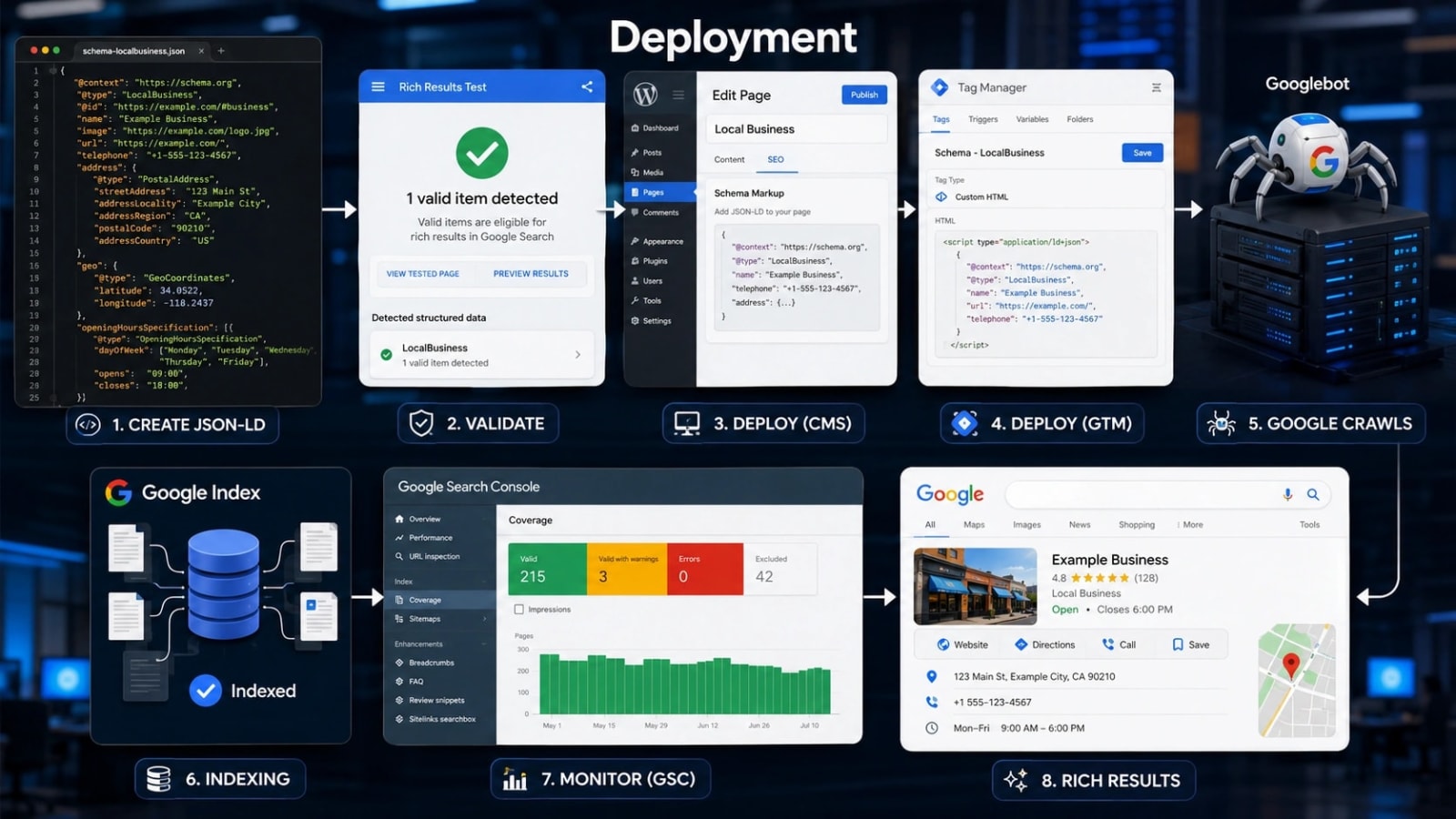
Schema markup can be written in three formats: JSON-LD, Microdata, and RDFa. Google’s official recommendation is JSON-LD. It sits inside a script tag and does not require modifying your visible HTML content. JSON-LD is placed inside a script tag with type=”application/ld+json” in the head or body of the page. It does not alter what users see, and it is significantly easier to maintain than Microdata or RDFa.
Deployment options vary by tech stack. Options include manual code insertion, CMS plugins for WordPress sites, Google Tag Manager, or developer-deployed schema templates for enterprise sites. Validation must happen after every deployment. Unvalidated schema can contain errors that silently prevent rich results from appearing, meaning you do the work and see none of the benefit.
Writing a LocalBusiness JSON-LD Block Correctly
Start with the @context set to “https://schema.org” and the @type set to your specific business subtype. These two declarations define what every other property means to Google’s processing engine. Include nested objects correctly. PostalAddress, GeoCoordinates, and OpeningHoursSpecification are nested inside LocalBusiness as separate objects, not listed as flat string properties.
For a restaurant, the structure should include @type set to Restaurant, along with name, url, and telephone. The address should be a full PostalAddress object with streetAddress, addressLocality, addressRegion, and postalCode as separate fields. The geo should be a GeoCoordinates object with explicit latitude and longitude values. The openingHoursSpecification should be an array with dayOfWeek arrays, plus opening and closing times for each day.
Add the hasMap property pointing to your Google Maps URL. This creates a direct machine-readable link between your website entity and your map listing. Also, ensure the name property in schema matches the business name in Google Business Profile exactly. Even a minor variation, such as an abbreviation or added punctuation, can create entity confusion that suppresses rich results.
Tools to Generate, Test, and Monitor Local Schema
Several reliable tools exist for generating schema markup. Google’s Structured Data Markup Helper is free and beginner-friendly. Merkle’s Schema Markup Generator is also free and supports all LocalBusiness subtypes. Experienced users can build JSON-LD templates manually for maximum control and accuracy.
For testing, Google’s Rich Results Test shows which rich result features your schema qualifies for. The Schema.org Validator checks syntax and property validity. Google Search Console’s Rich Results report monitors live performance over time.
Google Search Console’s Enhancements report flags schema errors and warnings at scale. Set up monitoring there so errors do not go unnoticed for weeks. For multi-location businesses, audit schema consistency across all location pages at least quarterly. A single outdated address in schema on a high-traffic page can suppress that location’s local results entirely.
Schema Markup Methods Compared: Manual vs Plugin vs GTM
Each deployment method has real tradeoffs. Choosing the wrong one for your tech stack leads to either maintenance headaches or implementation errors that go undetected. The right choice depends on your technical resources, CMS, and the number of locations you manage.
| Method | Control Level | Skill Required | Update Speed | Error Risk | Best For | Cost |
|---|---|---|---|---|---|---|
| Manual JSON-LD | Highest | High | Slow (requires dev) | Low if reviewed carefully | Custom and enterprise sites | Developer time only |
| CMS Plugin | Medium | Low | Fast | Medium (plugin bugs possible) | WordPress local businesses | Free to low paid |
| Google Tag Manager | High | Medium | Fast | Medium (trigger errors possible) | Marketing teams without dev access | Free |
Manual JSON-LD gives the highest degree of control and carries zero plugin dependency. It requires developer or technical SEO knowledge to maintain. CMS plugins are fast to deploy and have a low technical barrier. However, they can generate bloated or incorrect schema if misconfigured, and they rely on third-party updates. Google Tag Manager is flexible for marketers without server access. It allows condition-based schema firing, such as triggering schema only on location pages, but it requires careful trigger setup to avoid misfires.
The right choice depends on your situation. A single-location small business on WordPress should use a well-reviewed plugin. A multi-location enterprise should use developer-built JSON-LD templates per location. A marketing team with GTM access but no developer resources should use GTM with carefully defined trigger rules. Regardless of method, none of it matters if the underlying business data is wrong. Schema is only as accurate as the information it encodes.
Marketing Lad works with businesses to audit existing schema deployments and identify which deployment method is causing suppressed rich results before recommending a targeted fix.
The Most Damaging Schema Mistakes Local Businesses Make
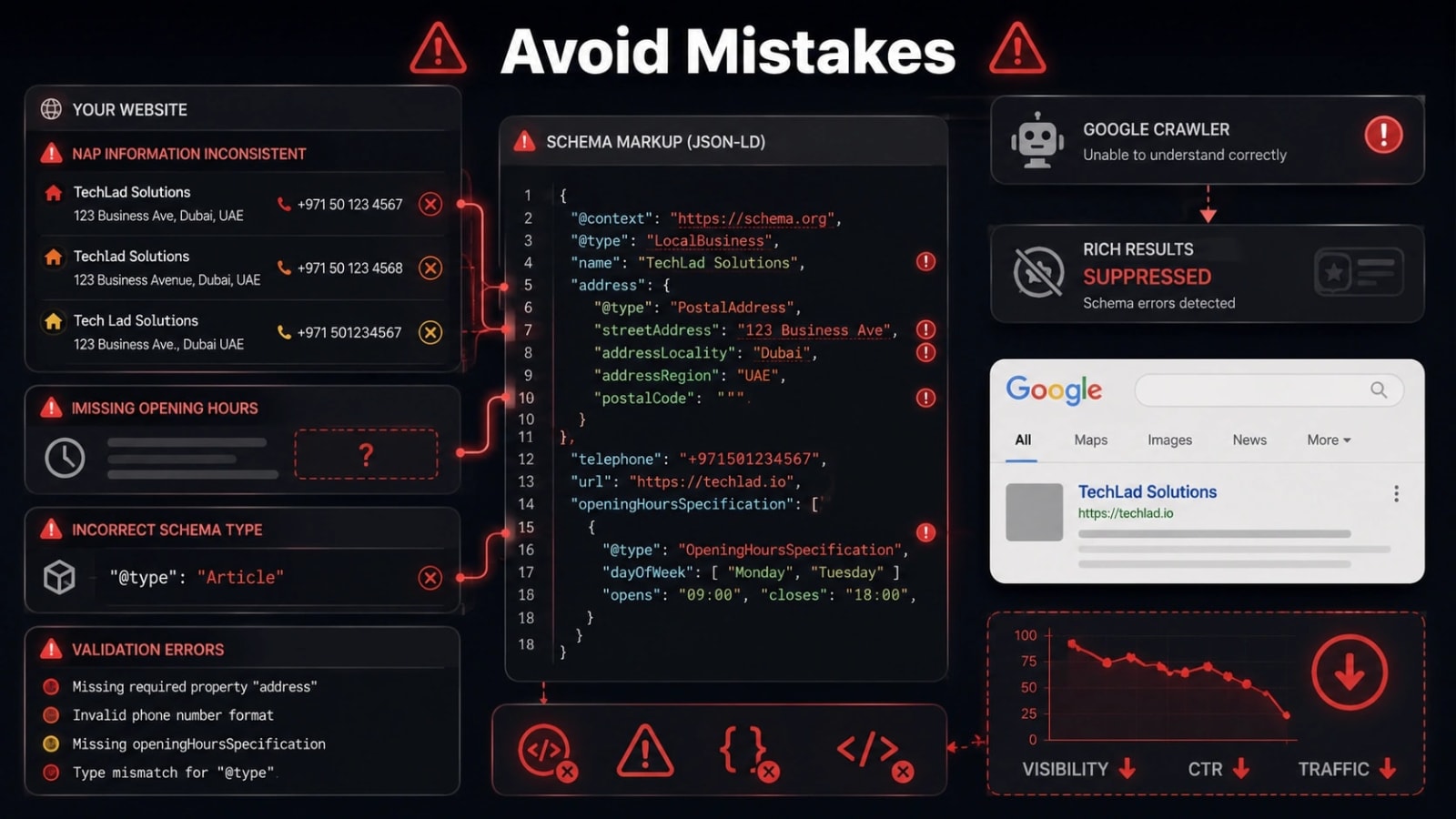
Schema errors do not always trigger Google penalties. However, they consistently prevent rich results from appearing. Businesses complete the technical work and see none of the benefit because a silent error blocks Google from processing the markup correctly. Knowing the most common mistakes prevents this outcome.
Here are the most common and damaging local schema mistakes to avoid:
- NAP inconsistency: Schema address does not match Google Business Profile or the website footer. Google treats these as conflicting signals and may suppress the rich result.
- Missing OpeningHoursSpecification: Leaving out hours means Google cannot show “Open Now” status. That feature is one of the highest-engagement elements in local rich results.
- Using @type: LocalBusiness when a specific subtype exists: This wastes a relevance signal and hands an advantage to competitors using the correct type.
- Marking up content that does not appear on the page: Google’s guidelines explicitly prohibit schema for content a user cannot see. This can result in a manual action against the site.
- Deploying site-wide template schema without customizing per-location data: Multi-location businesses often have every page using the same address because the template was never updated per branch.
- Forgetting to revalidate after a site redesign or CMS migration: Schema breaks silently during migrations and often goes unfixed for months without a monitoring process in place.
- Not including the URL property: Without a URL, Google cannot confidently associate the schema entity with the specific page it lives on.
How Schema Markup Supports Local Link Building Strategy
Schema markup and link building work together as complementary signals. Structured data establishes entity authority on your site. Backlinks from local sources such as chambers of commerce, local directories, and regional news sites build off-site authority. When Google sees consistent LocalBusiness schema on your site alongside incoming links from locally relevant sources, it builds a stronger entity profile for your business.
The sameAs schema property creates machine-readable links to external profiles where you also have backlinks. This creates a structured loop that reinforces entity recognition across Google’s knowledge graph. Marketing Lad helps local businesses build citation-quality backlinks from authoritative local sources. That external authority amplifies the on-site entity signals that schema markup establishes.
When a local news outlet or directory links to your business, the business name, address, and phone in that external mention should match your schema data exactly. Consistency across both on-site schema and off-site mentions is what strengthens entity confidence with Google over time.
Measuring Whether Your Local Schema Is Actually Working
The primary metric to track is impressions and clicks from rich result features in Google Search Console. Navigate to Performance, select Search type Web, then filter by queries and look for CTR changes after schema deployment. The Enhancements section in Search Console will show “Local Results” errors if your LocalBusiness schema has validation problems. Check that tab weekly after the initial deployment.
Compare CTR before and after schema deployment on the same set of local queries. A well-implemented LocalBusiness schema typically produces a visible CTR increase within four to eight weeks of Google re-crawling the page. As a secondary signal, monitor Google Business Profile “website clicks.” If schema is reinforcing your GBP entity correctly, you may see increased GBP visibility running in parallel with on-site improvements.
Do not declare schema “not working” after only one week. Google needs to recrawl and reprocess the page, which can take two to six weeks depending on crawl frequency for your site. Patience and consistent monitoring together give you the clearest picture of schema’s actual impact.
Final Thoughts
Schema markup for local SEO is not a technical luxury reserved for large brands. It is a foundational signal that tells Google exactly who your business is, where it operates, and what it offers, all in a format machines can read without guessing.
The businesses winning in local search in 2026 are implementing the right schema subtypes, keeping their structured data aligned with their Google Business Profile, and validating their markup regularly rather than treating it as a one-time task.
The key takeaways from this guide are straightforward. Use the most specific LocalBusiness subtype available. Populate every core property including hours, geo coordinates, and sameAs links. Deploy in JSON-LD format. Validate before and after every change.
Monitor performance inside Google Search Console on an ongoing basis. Schema does not operate in isolation. It works best when paired with strong local backlinks, consistent NAP data across the web, and a well-maintained Google Business Profile.
Marketing Lad helps local businesses build the external authority signals that amplify the on-site entity work that schema markup starts. Your next step is simple: audit your current schema using Google’s Rich Results Test today, identify which properties are missing, and prioritize OpeningHoursSpecification, GeoCoordinates, and sameAs if they are not already in place.
Frequently Asked Questions
Does schema markup directly improve my Google rankings for local searches?
Schema markup does not directly change ranking positions. However, it enables rich results that increase click-through rates and reinforces entity signals that support local ranking factors. When Google can confidently identify your business, location, and services through structured data, it has more reason to surface your listing prominently in relevant local searches. The CTR improvement from rich results also sends a positive engagement signal that indirectly benefits ranking over time.
What is the difference between LocalBusiness schema and Google Business Profile?
Google Business Profile is a separate Google-owned property you manage through a dashboard. It controls how your business appears in Google Maps and the Local Pack. LocalBusiness schema lives on your own website as structured data code. They are distinct systems, but they work together. Schema on your site reinforces the data Google already has from your GBP listing. When both sources contain identical, accurate business information, Google has higher confidence in your entity and is more likely to surface rich results and Local Pack visibility.
How often should I update my local business schema?
Update your schema whenever business information changes. This includes new hours, a new address, a new phone number, or added services. Revalidate the markup after every site update or CMS migration, since schema can break silently during technical changes. A quarterly full audit is a good baseline practice. For businesses that change hours seasonally, such as retail shops or restaurants, updating OpeningHoursSpecification at the start of each season prevents incorrect hours from appearing in search results.
Can I use multiple schema types on the same page?
Yes. A local business page can legitimately include LocalBusiness, BreadcrumbList, FAQPage, and AggregateRating schema on the same page without conflict. Each schema type describes a different aspect of the page content. The only rule is that each type must accurately describe real content that users can see on that page. Google prohibits marking up content that is hidden from users, and violating this guideline can result in a manual action that removes your rich result eligibility entirely.
Will schema markup help my business appear in the Google Local Pack?
Schema markup alone does not place you in the Local Pack. Local Pack placement is driven primarily by your Google Business Profile, review signals, proximity to the searcher, and local backlink authority. However, consistent LocalBusiness schema on your website that matches your GBP reinforces entity confidence with Google. Over time, this cross-source consistency can support stronger Local Pack rankings compared to competitors whose on-site schema conflicts with or is absent from their GBP data. Think of schema as one reinforcing layer within a broader local SEO strategy.