Last Updated on 02/06/2025
Backlinks have always remained essential to search engine optimization (SEO), impacting a website’s visibility and ranking on search engines like Google.
Links from other websites to yours act as digital votes of confidence, informing search algorithms that your content is valuable and legitimate.
Understanding and utilizing backlinks is essential for any website owner or digital marketer seeking to enhance their online visibility. However, identifying and analyzing these links can be difficult.
This blog will discuss the most effective methods for finding and evaluating backlinks using Google, thereby enhancing the SEO strategy.
What Are Backlinks? Why Are They Important?
Backlinks, or inbound or incoming links, are links from one website to another. These are often referred to as the base of successful online visibility methods.
These links are much more than simply navigation tools. Backlinks are digital votes of confidence in the internet’s intricate ecosystem.
When one website links to another, it effectively supports the content and credibility of the linked site. This endorsement is significant in the eyes of search engines such as Google.
Backlinks are crucial for enhancing your website’s search engine rankings, driving direct traffic, establishing trust and authority, and safeguarding against algorithm updates.
They are the foundation of every successful SEO strategy; understanding and using them may significantly impact your online visibility.
Why Should You Conduct Backlink Analysis?
Backlink analysis can help you learn about your competitors and your backlink profile, discover new link opportunities, understand how your competitors generate links, and identify areas where your website may be lacking.
This analysis can also identify any potentially harmful links, such as those from spammy or irrelevant websites, that could impair your search engine rankings.
However, the benefits do not stop there; understanding your backlink profile lets you strategize more effectively. You can examine what works, develop effective patterns, and discard techniques that aren’t generating results.
Lastly, the most essential advantage of reviewing backlink profiles is discovering numerous opportunities on your competitors’ websites.
How to Find Backlinks Using Google?
Finding backlinks using Google is one of the most straightforward and underrated link-building tactics.
With a few competent search operators, you can uncover where your competitors are getting links from, identify backlink opportunities, and even spot unlinked mentions of your brand. Here’s how to do it:
1. Use the link: Operator (Deprecated but Still Worth Testing)
Although Google officially deprecated the link: operator, it sometimes still returns partial results:
bashCopyEditlink:example.com
This shows some websites that link to the specified domain. However, since it’s no longer reliable, it’s better to rely on other methods outlined below.
2. Perform Brand + Keyword Mentions
Use Google to find sites that mention your brand or content without linking back to it. Just search:
arduinoCopyEdit"Your Brand Name" -site:yourwebsite.com
This will show mentions of your brand on external sites. If they haven’t linked back to you, ask for a link.
3. Reverse-Engineer Competitor Backlinks
You can search for content that links to your competitors by combining their brand name or article titles with specific footprints:
arduinoCopyEdit"Competitor Brand" + "guest post by"
"Competitor Brand" + "sponsored by"
Or if you know the article title:
vbnetCopyEditintitle:"Competitor’s Article Title"
Check which sites shared or mentioned it. These sites might be open to linking to similar (or better) content from you.
4. Search for Niche-Specific Link Opportunities
Use Google to find blogs, directories, or resource pages related to your niche. For example:
arduinoCopyEdit"your keyword" + "write for us"
"your keyword" + "submit a guest post"
"your keyword" + "resources"
"your keyword" + "best tools"
These footprints can help you discover backlink prospects open to content contributions or link placements.
5. Find Forum and Comment Links
Forums and blog comments can still offer value if done naturally. Search:
arduinoCopyEdit"your keyword" + "inurl:forum"
"your keyword" + "leave a comment"
Look for threads or blog posts where you can add value and potentially include a link, without spamming.
How Do You Perform Advanced Search on Google?
Performing an advanced Google search is a thorough procedure that involves refining your search results using specialized search operators.
This skill is essential for anyone seeking to discover valuable backlink opportunities using Google operators. Let’s explore a step-by-step process for conducting advanced searches using Google operators.
a. Understanding The Basics
It is essential to understand the underlying rules defining how Google operators work. Operators are special commands or symbols that you can use to narrow down the results in your search query. Familiar operators include “site,” “inurl,” and “intitle.”
b. Identify Your Target
Select the type of backlinks you are looking for. Are you interested in specific websites, content categories, or niches? Understanding your objectives will help you choose the most appropriate operators.
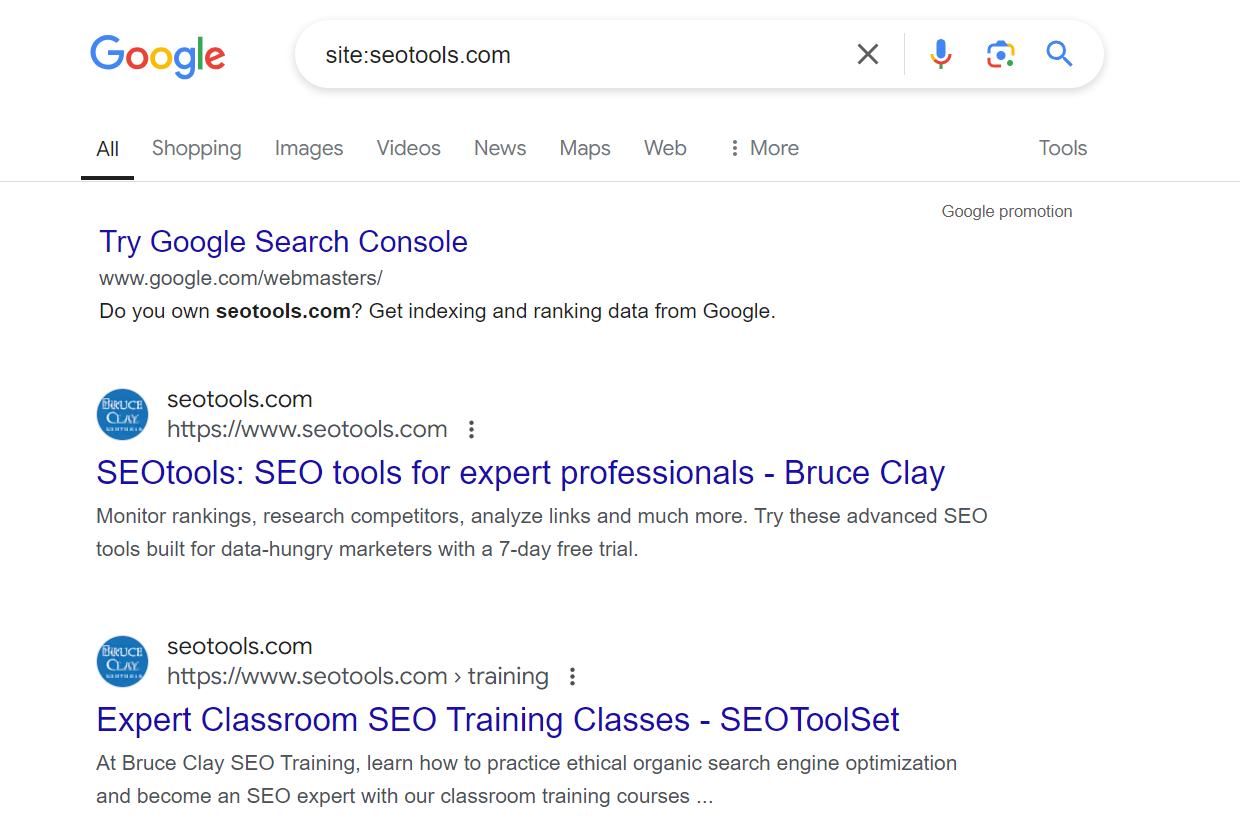
c. Use The “Site” Operator
To get backlinks from a specific website, use the “site:” operator with its URL. For example, “site:example.com” yields results that direct users to the specified website.
d. Using The “Inurl” and “Intitle” Operators
If you want backlinks from specific URLs or page titles, use the “inurl:” and “intitle:” operators. For example, “inurl:backlinks” will assist you in identifying pages having “backlinks” in their URL.
e. Explore Linking Domains
To locate websites that connect to your chosen domain, enter “link:” followed by the URL. For example, “link:example.com” will return websites that link to the supplied domain.
f. Combine Operators
You can use multiple operators in a search to further refine your results. For example, “site:example.com inurl:backlinks” will allow you to locate backlinks on certain pages inside the “example.com” website that have “backlinks” in their URLs.
g. Analyze The Results
After conducting your search, thoroughly review the results to identify potential backlink opportunities. Look for authoritative websites or information related to your niche.
2. Check Competitors’ Backlinks
Understanding your competitors is essential. You can also look at your competitors’ backlink profiles by using Google search operators.
If your competitor uses images such as infographics, you can use Google’s image search to discover where these images exist on other websites. This can help you identify websites with comparable content.
3. Using SEO Tools
Third-party SEO tools, such as Ahrefs, SEMrush, and Moz, can provide precise SEO statistics for any web page you choose. These tools can also help you keep track of your backlinks.
These SEO tools provide thorough insights into your backlink profile. Insert your website’s URL, whether you search Google or type the URL directly. You will receive a comprehensive report that includes all sites linking back to you, the quality of these links, and other relevant data.
However, because some tools use their crawlers to locate pages on a website, the pages shown may not be indexed by Google.
If Google does not index a page, it will have little internet visibility. A third-party SEO tool may not provide adequate, metric-driven insights under these conditions.
4. Using Google Search Console
Google Search Console is a valuable tool for webmasters and SEO professionals. While it does not immediately display backlinks, it provides information about how Google evaluates your site, which can indirectly help you discover backlinks.
Here’s what you can find on Google Search Console:
- Total Backlinks: This feature provides an overview of your site’s backlinks and referring websites.
- Top-Linked Pages: Google Search Console displays the pages on your site with the most backlinks.
- Internal and External Links: You can view the number of internal and external links on your website.
- Linking Domains: This feature displays the domains that link to your website.
Simple Steps for Accessing Backlink Data in Google Search Console
- Log in to Google Search Console
- Go to Google Search Console and sign in using your Google account. Make sure your website is authenticated.
- You may find the Backlinks Report here.
- After logging in, navigate to the “Links” section on the left side menu. Click on it to view the backlinks report. This report explains how to locate backlinks using Google Search Console.
- View the Top Linking Sites
- The “External links” section displays the top websites that connect to your site. This highlights the origins of your backlinks, allowing you to identify the most valuable links.
- Check Top Linked Pages
- Google Search Console can tell you which of your pages has the most backlinks. This allows you to observe what kind of content attracts links so you can develop more of it and find backlinks with Google.
- Then, review the Anchor Text.
- The “Top linking text” area displays the words used in links to your site. This can reveal how people link to your material and help you identify popular keywords for backlinks.
5. Using Google Alerts
Google Alerts is a valuable tool that informs you when new information about your website, competitors, or key topics is discussed online. This can help you find new backlinks. So, set up notifications for your brand name, products, and key phrases. When you receive an alert, make sure it is linked.
6. Manual Checking
While it requires more effort, manually checking for backlinks can occasionally uncover links that automated programs miss. This involves using search engines to identify who has cited or referenced your brand, specific content titles, or unique phrases from your website.
Track New and Lost Backlinks
Keep track of your backlinks, as they are essential for determining who connects to you and whether any connections have been removed. Monitoring backlinks is vital in the following ways:
- Keep track of your backlinks: Knowing which websites link to yours will help you understand how people perceive the importance of your website.
- Discover new connecting sites: By monitoring your backlinks, you can identify new websites that link to yours. Tools such as Google Search Console can help you detect backlinks and track where your content is shared.
- Be aware of lost links: Links to your site may remain the same due to changes or revisions to your website. Monitoring your backlinks will alert you to changes, allowing you to take the necessary action.
How to Monitor Backlinks Effectively?
- Use Google Search Console: Google Search Console is a free tool that shows you which websites link to yours. Check it periodically to monitor backlinks and find new opportunities to build links.
- Set up alerts: Consider employing tools like Ahrefs or Semrush to generate alerts. They can alert you when new backlinks are created or old ones are removed.
- Check regularly: Make it a habit to assess your backlinks on a regular basis. Check for any changes or patterns in how your links are performing. This will help you better understand your site’s SEO performance and address any issues that develop. If you address these concerns quickly, you will avoid big problems in the future.
Conclusion
Ultimately, we recognize the significance of backlinks, and utilizing Google to discover backlinks is crucial for enhancing your website’s credibility and online presence.
Concentrate on obtaining high-quality, relevant links that value your linked sites. Patience and dedication are essential, as effective link-building is a continuous process that necessitates constant effort and improvement.
FAQs
To gain backlinks, publish high-quality, shareable content that organically attracts links. Publish guest articles on reputable websites within your niche. Engage in broken link building by delivering your content as an alternative to dead links. Utilize social media and online forums to promote your products. Develop ties with influencers and cooperate on content. Always prioritize offering value to obtain authentic, high-quality backlinks.
The “Links” report in Google Search Console will help determine who links to your website. Use Google search operators such as “link:yourwebsite.com” to find connecting pages. Set up Google Alerts for your brand to receive new mentions and links.
Yes, you can use search operators like "yourdomain.com" -site:yourdomain.com to find mentions of your site. However, it’s better to use tools like Ahrefs, SEMrush, or Google Search Console for a detailed backlink profile.
Type "Your Brand Name" -site:yourdomain.com into Google. Look for pages that mention your brand but don’t include a clickable link. Reach out and politely request a backlink.
Yes! Try:"Competitor Name" + "guest post""Competitor Brand" + "sponsored by"intitle:"Competitor Article Title"
These searches help uncover websites linked to competitors, giving you potential backlink targets.
Google is great for manual research, spotting quick opportunities, and verifying mentions. However, SEO tools provide more comprehensive data, including link metrics, anchor texts, and dofollow/nofollow filters.
Search using:"your keyword" + "write for us""your keyword" + "submit a guest post""your keyword" + "contribute"
These queries reveal websites that accept guest contributions — a potent method for earning backlinks.
Read more on:
- 100+ WhatsApp About Lines That Will Impress Your Contacts
- The Most Followed Social Media Accounts of 2025
- How DeepSeek Is Better Than ChatGPT?
- SEO Is Not Dead: Shocking Truth Revealed!
- What Are Two Key Elements in Deciding How to Collect Data for Marketing Research?
- What Is Janitor.ai? What Makes It Unique?