
On this page5
AI-generated writing appears everywhere, from product descriptions to school assignments. If you are unsure whether a person or AI wrote a text, you can check it with a detector and a short manual review.
This guide explains how to check for AI using a detector, a close reading, and evidence of how the text was written. Together, these checks can help you detect AI-generated content and understand what a detector’s results actually mean.
Check out our analysis on Voozon.com Review: What the Traffic Numbers Don’t Tell You
How to Check for AI With an AI Detection Tool
AI checkers look for patterns associated with machine-generated writing. For this walkthrough, we chose Clever AI Detector because its free report includes a probability score, confidence indicators, and highlighted sentences. That detail helps you locate passages to review instead of relying on a single number. You can use the text AI detector without creating an account.
Step 1. Prepare the Text for an Accurate Check
Choose a complete passage with enough meaning to assess, not a single sentence. Clever AI Detector accepts 80 to 10,000 English words, so include at least 80 words to detect AI text. Remove menus, reference lists, copied quotations, assignment directions, and anything else the writer didn’t create. For the first check, leave the writer’s wording unchanged so the report reflects the original sample.
Mixed documents need extra care. Check sections from different authors or sources separately, then consider the document as a whole. Save the original version so you can compare it with later checks or edits.
Step 2. Check the Text With Clever AI Detector
Open Clever AI Detector in your browser and paste the prepared passage into the “Text to check for AI” field. You can choose “Upload file” instead.
You don’t need an account for a standard check. Signing in is optional and lets you save your check history.
Click “Check for AI” and let the AI detection tool finish without refreshing or closing the page. Keep the report open; the next step explains what its score and sentence signals mean.
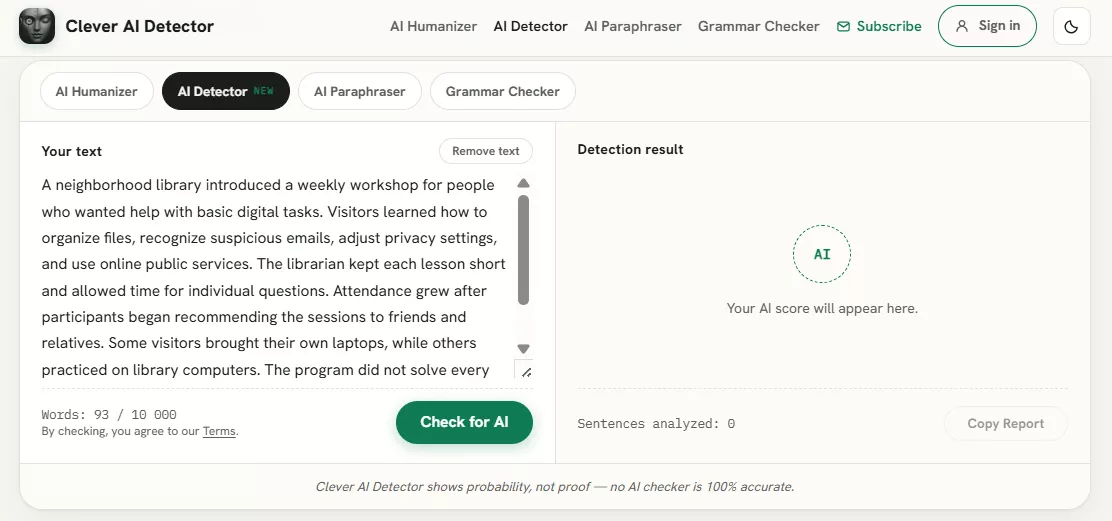
Text entered into Clever AI Detector before analysis.
Step 3. Interpret the AI Score and Sentence Signals
Begin with the overall probability score, verdict, and confidence level, which shows how strongly the tool supports its assessment. The score estimates how closely the passage resembles machine-generated writing. It doesn’t measure authorship. A result such as 90% AI does not mean that AI wrote 90% of the words; a score near the middle signals greater uncertainty. Don’t force an unclear AI writing detector report into a firm human-or-AI answer.
Then examine the sentence-level signals, which mark passages that influenced the report. Compare those sentences with the original draft, sources, and nearby wording.
You can check a suspicious section with the AI content detector tool, but still consider the full document. A high score calls for more scrutiny; a low score does not prove human authorship. In either case, the report supports a judgment rather than settling it.
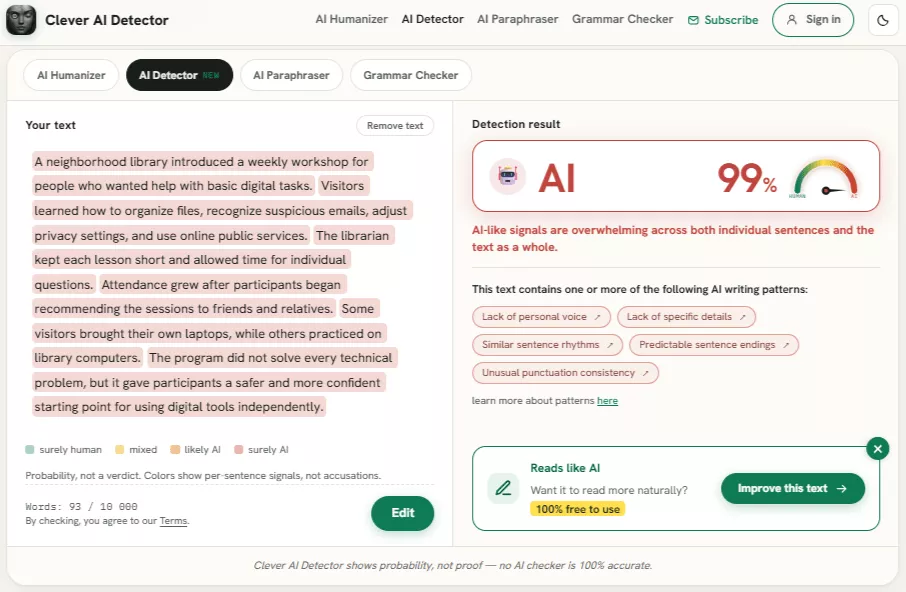
Clever AI Detector report showing the probability score and sentence-level signals.
How to Detect AI in Writing Without a Tool
AI can sometimes be recognized without an extra check, especially in a longer passage. The signs below are not proof by themselves, but they can show where to look more closely.
Look for Repetitive Language, Typical AI Phrases, and Punctuation Patterns
Read a substantial passage instead of hunting for a single repeated word. Look for repeated transitions such as “Moreover,” “Furthermore,” or “It is important to note,” as well as identical sentence openings, conclusions, and paragraphs of the same length. Three paragraphs beginning with “Additionally,” for example, can feel mechanical.
Punctuation can also look overly regular: every sentence may use the same commas, em dashes, or perfectly balanced clauses. These signals can help you detect AI writing, but a strict house style or a writer’s habits can create similar patterns.
Tools that make AI writing sound more human can also change these patterns. Natural phrasing alone, therefore, does not establish who wrote a passage.
The examples below illustrate differences in style, not verified authorship. Any claimed result, such as time saved, would need evidence in a real article.
| AI-like version | More human version |
| Our solution delivers a seamless, efficient experience for every user. | The new dashboard cut our team’s weekly reporting time by about an hour. |
| Furthermore, the platform is highly effective. | The platform reduced approval delays because managers can see comments in one place. |
Evaluate Tone, Specificity, and Personal Context
A smooth, polished tone can sound convincing on its own while hiding a lack of clear facts, examples, or useful detail.
A product review, for instance, may praise excellent performance without naming one feature or test result. Ask whether the writing includes useful names, constraints, observations, or decisions, and whether it fits its intended audience. Consider whether its word choice and level of detail suit the reader’s needs.
Specific details help you detect AI-generated writing, but they still need judgment. AI can invent convincing anecdotes, while a skilled person may choose a neutral tone and avoid personal stories.
Verify Facts, Sources, and Quotations
Turn factual claims into items you can check: names, dates, statistics, study findings, product features, laws, and quotations. Open each cited source to confirm it exists, supports the claim, and hasn’t been described inaccurately. A simple warning sign is a quotation whose cited page does not contain the quoted words. When no direct link is given, search for a distinctive part of the quote. Favor primary sources such as original research or official documentation.
Keep a brief record of what you confirmed, contradicted, or couldn’t verify. AI-generated text can contain invented citations or confident errors, but people make mistakes as well.
Compare the Text With Other Evidence
Writing becomes easier to assess when you can see how it developed. Compare it with earlier work from the same person, ideally written for a similar audience and purpose. Outlines, notes, research files, saved drafts, and version history may show the path from idea to finished copy.
You can also ask the author to explain a key argument, source choice, example, or revision. Their explanation should make sense in light of the document, but nervousness, weak memory, or language difficulties are not signs of AI use.
Ordinary editing can explain a change in style, too. If you check the grammar online while preparing your own work, keep the earlier draft. Comparing versions shows which changes came from proofreading rather than leaving a reviewer to guess.
Metadata may be incomplete because ordinary workflows differ. Request only information that matters, respect privacy, and give the writer a fair chance to respond before making important academic, employment, or publishing decisions.
How Accurate Are AI Writing Detectors?
AI writing detectors make two main kinds of errors. A false positive flags human writing as AI-generated, while a false negative labels AI-assisted writing as human. Performance varies with text length, style, readability, subject matter, editing, paraphrasing, and the model that produced the passage.
Short samples offer fewer patterns to analyze. Formal, heavily edited, formulaic, or non-native English may look unusually predictable, even when written by a person. The reverse problem also occurs: AI-generated text can become harder to spot after substantial human revision.
The 2025 COLING research on machine-generated text detection reached a clear finding. Detector performance was highly sensitive to writing style and text complexity, and it sometimes performed much worse. There is no single, honest universal accuracy percentage, and different detectors do not perform equally well.
Use a detector to decide what to review first. Important decisions still require several kinds of information and a meaningful opportunity for the writer to respond.
What to Do If Your Text Is Flagged as AI-Generated
A detector flag should prompt a careful reading of the passage, not a race to reach a particular number or score.
- Read the overall score, confidence level, and highlighted sentences before reacting to the percentage.
- Confirm each fact, quotation, and source, then replace vague claims with accurate details that fit the subject.
- Rewrite repetitive or predictable passages in your own words. Change sentence rhythm only when it improves clarity, and keep the intended meaning.
- If AI assistance is allowed, use rewriting tools only as editing aids. Personally check every change for accuracy, voice, and any required disclosure.
- After making meaningful changes, proofread the text, save the new version, and run the detector again for comparison.
The new score is another clue, not a target. If you wrote the text, keep useful records of your process and ask for human review instead of weakening clear, accurate prose. Every revision should follow the applicable academic, workplace, publishing, and authorship rules.
FAQ
No. A detector examines writing patterns in the passage; it does not watch the writing process. It cannot name the author or show exactly how the draft was created, and a person may use AI for only one part. To check if something is AI-generated, compare the score with drafts, sources, and the author’s explanation. Never present it as proof of misconduct.
Yes. False positives can occur with every detector. Formal, heavily edited, formulaic, concise, or non-native English may resemble machine-generated writing, while short samples and rigid templates offer little information. A flagged writer should retain any useful supporting material and request a human review. The goal is a fair assessment, not damaging clear and accurate prose to lower a score.
An AI checker for copywriters should show probability and uncertainty rather than claim certainty. Sentence-level signals should help locate passages worth examining. Check its supported languages, sample limits, price, usage limits, account rules, saved history, and privacy practices. The service should explain false positives and responsible use. Try it on several typical samples, not just one carefully chosen passage, and favor a transparent tool that offers useful detail over a simple human-or-AI label.
