
On this page11
- Table of Contents
- What Is Pinterest SEO and Why It Works Differently From Google SEO
- Pinterest Keyword Research: Finding Terms That Drive Real Traffic
- Optimizing Your Pinterest Profile, Boards, and Pins for Search
- Pinterest SEO vs. Google SEO: Key Differences and How They Work Together
- Common Pinterest SEO Mistakes Marketing Managers Make
- Optimizing Your Pinterest Profile, Boards, and Pins for Search
- Pinterest SEO vs. Google SEO: Key Differences and How They Work Together
- Common Pinterest SEO Mistakes Marketing Managers Make
- Conclusion
- Frequently Asked Questions
Pinterest has over 500 million monthly active users, yet most SaaS and marketing managers treat it as a secondary social platform rather than a search engine, a costly oversight when organic Pinterest traffic can drive consistent, compounding website visits without paid spend.
Pinterest functions more like Google than Instagram: users search with intent, pins surface months or years after publishing, and keyword placement directly controls visibility in results.
In 2026, Pinterest’s visual search capabilities and AI-driven recommendations have made keyword-optimized pins increasingly powerful for B2B and SaaS content discovery, making it a channel worth understanding deeply.
Table of Contents
What Is Pinterest SEO and Why It Works Differently From Google SEO
Pinterest Keyword Research: Finding Terms That Drive Real Traffic
Optimizing Your Pinterest Profile, Boards, and Pins for Search
Pinterest SEO vs. Google SEO: Key Differences and How They Work Together
What Is Pinterest SEO and Why It Works Differently From Google SEO

Pinterest SEO is the practice of optimizing your profile, boards, and pins so they rank in Pinterest’s native search results and get distributed through its Smart Feed algorithm.
Unlike Google, Pinterest ranks visual content first: the image or video itself is the primary signal, followed by text metadata like titles, descriptions, and alt text. This visual-first indexing model changes how you structure content, because a compelling image is a prerequisite, not an afterthought.
Pinterest also has a longer content shelf life than virtually any other platform. A well-optimized pin can generate traffic three to six months after it is published, and top-performing pins continue surfacing for years without any additional promotion.
For teams managing limited content budgets, this compounding return on a single piece of content is a significant strategic advantage.
From a link-building perspective, every pin links back to a source URL, meaning high-traffic pins can generate referral traffic and user engagement signals that support off-page SEO. This makes Pinterest a distribution channel with measurable SEO value, not just a brand awareness exercise.
The key difference from social media SEO is that engagement metrics like repins and saves influence ranking, but keyword relevance is the primary filter that determines whether a pin enters a user’s feed at all.
Read More On SXO Guide: Boost Rankings & User Experience in 2026
How the Pinterest Search Algorithm Works
Pinterest’s algorithm uses four main ranking factors: domain quality, pin quality, pinner quality, and topic relevance.
You must address each in a complete Pinterest SEO strategy, because weakness in any one area limits the ceiling of your results.
Domain quality is determined by how much Pinterest traffic currently flows to your website.
Connecting your site via Pinterest’s domain verification improves this score immediately and signals to the algorithm that your destination URLs are credible and established. Pin quality is measured by saves, clicks, comments, and close-ups relative to impressions.
A new pin with a high early engagement rate gets pushed to broader audiences, which is why the first 24 to 48 hours after publishing a pin are critical for its long-term distribution.
Pinner quality reflects your account’s overall engagement history. Consistent weekly pinning, a low spam score, and a healthy ratio of original pins to repins all contribute positively. This is why building your account methodically over time produces better results than sporadic high-volume publishing campaigns.
Topic relevance is driven entirely by your keyword usage in pin titles, descriptions, board names, board descriptions, and profile bio. Most marketers underinvest here, writing vague, aesthetic captions instead of searchable, keyword-rich descriptions that tell the algorithm exactly what the pin is about.
How the Smart Feed Differs From Search Results
Pinterest search results rank pins for a specific query the user enters. These are high-intent placements, directly comparable to Google’s organic results, and they reward precise keyword targeting.
The Smart Feed, by contrast, is Pinterest’s homepage feed. It surfaces pins based on past user behavior, followed boards, and content the algorithm predicts will interest that user. Keyword optimization still matters here because it determines what topics your content is associated with at the account and board level.
Promoted pins appear in both placements, but organic pins that earn strong engagement metrics are given disproportionate Smart Feed exposure, making SEO and content quality interdependent. For SaaS marketers, the Smart Feed is the primary discovery mechanism for new audiences who have not yet searched for your category.
This makes board topic selection a strategic SEO decision, not just an organizational one. Choosing boards that align with high-volume Pinterest search categories increases the likelihood that your content surfaces to users who aren't yet aware of your brand.
Pinterest Keyword Research: Finding Terms That Drive Real Traffic

Pinterest has its own keyword research tools that are separate from Google Keyword Planner. Starting your research inside Pinterest gives you demand data specific to what Pinterest users are actively searching, which often differs meaningfully from Google search behavior.
The four primary keyword research methods on Pinterest are the Pinterest search bar autocomplete, Pinterest Trends, the Ads keyword tool (free to access without running ads), and competitor board analysis.
Long-tail keywords perform particularly well on Pinterest because the platform surfaces specific, intent-driven queries. A pin optimized for “SaaS onboarding email sequence template” will consistently outperform one optimized for the broader term “email marketing.”
Keyword volume benchmarks also differ from Google: a Pinterest keyword with 10,000 monthly searches is considered high-volume on the platform, making it easier to rank for terms that would be extremely competitive in Google search.
This lower competition threshold is one of Pinterest’s most underutilized advantages for growing brands.
Using Pinterest’s Native Tools for Keyword Discovery
Building a Pinterest keyword list starts with the platform’s own tools, used in sequence. Here is the step-by-step approach that produces the most reliable keyword data.
Step 1: Type your seed keyword into the Pinterest search bar and screenshot the autocomplete suggestions. These are real queries users type, ordered by volume, and they represent your highest-priority keyword targets.
Step 2: Look at the colored category bubbles that appear below the search bar after running a search. These are Pinterest’s own content categories for that topic and represent high-volume sub-niches worth targeting with dedicated boards and pin series.
Step 3: Open Pinterest Trends at trends.pinterest.com to see seasonal search volume data, trending keywords in your niche, and year-over-year growth rates. This tool is free and available to all business accounts, and it is the only way to verify whether keyword interest is growing or declining before you invest content resources in a topic.
Step 4: Access the Pinterest Ads Manager, create a campaign draft without publishing it, and use the keyword tool to see exact monthly search volumes. Then discard the draft. This gives you data precision that the search bar autocomplete alone cannot provide.
Step 5: Analyze the top five pins ranking for your target keyword by clicking each one and reading its full description. Identify the keyword patterns they use and the board categories they are saved to. This reverse-engineering approach reveals the keyword clusters Pinterest associates with your niche right now.
One timing insight: Pinterest Trends data shows interest in B2B and SaaS content peaks in January, September, and October. Planning your high-priority pin publishing around these windows maximizes early engagement, which accelerates algorithmic distribution.
Competitor Board Analysis for Keyword Intelligence
Competitor analysis on Pinterest focuses on board structure and description language rather than follower counts.
Search your primary keyword on Pinterest and identify the top three accounts whose pins consistently appear on the first page of results. Study their board names, board descriptions, and the keywords repeated across their top-performing pin descriptions.
This reveals the keyword clusters Pinterest has already associated with your niche, giving you a validated starting point rather than guesswork.
Compare each competitor board's follower count with how many pins it contains. Boards with fewer pins but high followers signal that keyword relevance and engagement quality matter more than sheer publishing volume.
Look closely at competitor profile bios, too: the keywords they include directly influence which search queries their profile surfaces for, and this connection between bio keywords and profile-level rankings is often overlooked in Pinterest SEO guidance.
Avoid copying competitor keywords without checking Pinterest Trends to verify whether those terms are growing or declining. A keyword that drove strong results twelve months ago may be past its peak, while adjacent terms may be entering a growth phase that presents a first-mover opportunity.
Optimizing Your Pinterest Profile, Boards, and Pins for Search
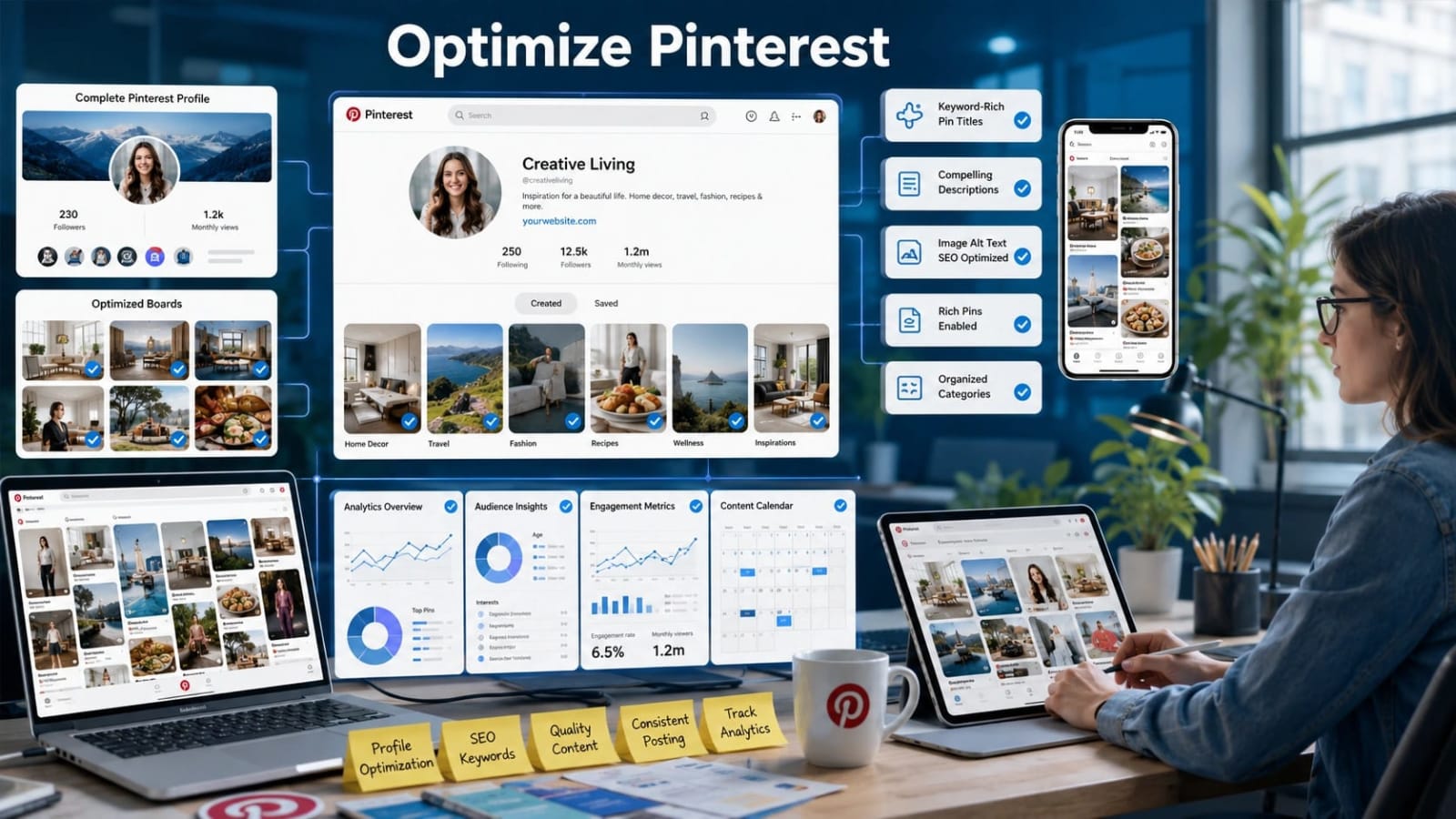
Pinterest SEO operates at three levels simultaneously: the account level (your profile), the board level, and the individual pin level.
Neglecting any single level weakens the entire strategy, because the algorithm evaluates all three when determining how widely to distribute your content.
Complete profile optimization before publishing any pins, since Pinterest's algorithm and Google’s web crawler crawl your display name, bio, and website URL.
Board optimization is the most underutilized layer of Pinterest SEO.
A well-described board signals to the algorithm what topics your content covers, improving the relevance score of every pin saved to it. Pin-level optimization requires specific keyword placement in the pin title, the first 50 characters of the description, the image alt text, and the destination URL’s page title.
All four elements are indexed, and you should address all four for every pin you publish.
The table below compares each optimization element by ranking impact, effort required, and update frequency.
Optimization Element | Ranking Impact | Effort Required | Update Frequency |
|---|---|---|---|
Profile Bio | High | Low | Quarterly |
Board Name | High | Low | Once, then refine |
Board Description | High | Medium | Twice per year |
Pin Title | Very High | Low | Per pin |
Pin Description | Very High | Medium | Per pin |
Image Alt Text | Medium | Low | Per pin |
Destination URL | Medium | Low | Per pin |
Profile and Board SEO Best Practices
Your Pinterest display name should include your brand name plus one primary keyword. For example, “Marketing Lad | SEO and Link-Building” uses the display name field to communicate topical relevance to both users and the algorithm, which gives this field high ranking weight.
Your bio has a 160-character limit and should naturally include two to three keywords that describe your content category, what your audience will find on your profile, and a clear value statement.
Board names must be readable keyword phrases, not creative titles. “Link Building Strategies for SaaS” will rank in Pinterest search; “My Faves” will not. Board descriptions should be two to three sentences, 200 to 500 characters, and include your primary board keyword plus two to three semantically related keywords.
Write them as a paragraph, not a keyword list, since natural sentence structure reads better to the algorithm’s spam filter and to users who view your profile.
Create at least 10 boards before publishing aggressively, so the algorithm can establish your account’s topical authority across a defined subject area.
Set each board to public immediately upon creation. Private boards aren't indexed and contribute nothing to your Pinterest SEO, no matter how well-optimized their descriptions are.
Pin Title, Description, and Image Alt Text Optimization
Pin titles are limited to 100 characters and carry the single highest text-field weight in Pinterest’s ranking algorithm. Place your primary keyword in the first 40 characters, because truncation in the feed means users and the algorithm both prioritize what appears first.
Pin descriptions should be 150 to 300 characters for standard pins and up to 500 characters for idea pins. Lead with your primary keyword in the first sentence, then add two to three supporting keywords woven naturally into subsequent sentences.
Avoid keyword stuffing in descriptions.
Pinterest’s spam filter flags pins with unnaturally dense keyword repetition and actively suppresses their distribution, which is the opposite of the intended effect. Most marketers skip image alt text, but Pinterest’s image recognition system reads it to verify that the visual content matches the text metadata. Write a concise, keyword-inclusive description of what the image actually shows, rather than repeating your pin title.
Use rich pins where applicable. Article rich pins automatically pull the meta title and meta description from your linked page, adding another layer of keyword data to the pin’s index entry without any extra manual work at the pin level.
When saving a pin, follow this sequence: (1) write the title with your primary keyword in the first 40 characters, (2) write the description starting with the keyword in sentence form, (3) select the most relevant board, (4) add alt text in the image upload field describing the image content, and (5) verify the destination URL resolves correctly without redirects.
Pinterest SEO vs. Google SEO: Key Differences and How They Work Together

Understanding where Pinterest SEO and Google SEO diverge helps marketing managers allocate effort correctly. They are complementary strategies, not interchangeable ones, and the teams that get the most value from
Pinterest are those who integrate it with their existing SEO activity rather than treating it as a standalone channel.
Factor | Pinterest SEO | Google SEO |
|---|---|---|
Keyword Research Tools | Pinterest search bar, Trends, Ads tool | Search Console, Keyword Planner, Ahrefs |
Content Format | Visual (image or video) with text metadata | Text-first (articles, pages, structured data) |
Ranking Timeline | 2 to 4 weeks for initial ranking signals | 3 to 12 months for competitive terms |
Backlink Influence | Minimal direct link equity (nofollow) | High, backlinks are a primary ranking signal |
Content Shelf Life | Months to years per pin | Variable, requires regular updates |
Traffic Intent Level | Primarily discovery and inspiration phase | Mixed, skews toward decision and comparison phase |
The most important overlap between the two channels is Google’s indexing of Pinterest pins. A well-optimized pin can rank in Google Image Search and Google Discover, creating a secondary organic traffic stream from the same content at no additional production cost.
Pinterest traffic tends toward the discovery phase of the buyer journey, where users explore ideas and options, while Google traffic skews toward decision-phase intent. This makes Pinterest particularly effective for top-of-funnel SaaS content like guides, templates, and educational resources that introduce users to your brand before they are ready to evaluate solutions.
How Pinterest Pins Support Off-Page SEO and Link-Building
Every pin includes a clickable destination URL. When a pin generates thousands of saves and clicks, the destination page receives sustained referral traffic that Google interprets as a quality engagement signal for that URL.
While Pinterest uses nofollow attributes on most outbound links, limiting direct link equity transfer, the referral traffic volume and brand search lift generated by high-performing pins create measurable indirect SEO benefits.
Marketing Lad’s approach to link-building includes identifying content assets worth promoting on Pinterest as part of a broader off-page strategy. Pairing editorial backlink acquisition with Pinterest distribution accelerates a page’s authority growth by ensuring it receives traffic and engagement signals while the link-building campaign matures.
Consider a SaaS company that publishes a data-driven report and then creates five to ten pin variations linking to it. That campaign can generate hundreds of monthly referral visits while the link-building work for that page is still underway, reducing the time before the page sees meaningful organic traffic.
A practical best practice: when building links to a target page, create a dedicated Pinterest board for that content topic and pin every supporting article, infographic, and resource to it. This signals topical depth to both Pinterest and Google, reinforcing the page’s authority in that subject area from two directions simultaneously.
Common Pinterest SEO Mistakes Marketing Managers Make

Most Pinterest SEO failures are not caused by algorithm updates or platform limitations. They result from a small set of repeatable, fixable mistakes that experienced practitioners have identified across accounts in every industry. Recognizing these patterns early prevents months of wasted publishing effort.
Using a personal account instead of a Pinterest Business account: Business accounts unlock analytics, rich pins, and the Ads keyword tool, all essential for SEO work. There is no legitimate reason to manage a brand presence from a personal account.
Publishing pins inconsistently: Pinterest rewards accounts that pin five to fifteen times per day, mixing original and repinned content. Accounts that publish in bursts then go silent lose algorithmic favor quickly and must rebuild momentum from scratch.
Linking pins to broken URLs or redirect chains: Pinterest’s spam detection actively suppresses pins with broken or low-quality destination URLs. Check every destination URL before publishing and monitor it over time.
Creating boards with fewer than 20 pins: Thin boards signal low authority to the algorithm and are rarely surfaced in category search results. Build boards to a meaningful depth before promoting them.
Writing generic descriptions: Descriptions like “Check this out!” give the algorithm no information to categorize the pin. Pinterest cannot rank content it cannot identify, and vague descriptions are the fastest way to prevent distribution.
Ignoring Pinterest Analytics outbound click data: The platform shows which pins generate the most outbound clicks to your site, which is the metric that actually drives business value. Optimizing toward saves alone will not improve website traffic.
Pinterest SEO Tools Worth Using in 2026
Pinterest Business Analytics (free, built-in) tracks impressions, saves, outbound clicks, and pin performance over time. Outbound clicks are the most important metric for traffic-focused SEO goals and should be your primary performance indicator.
Pinterest Trends (free at trends.pinterest.com) provides seasonal and trending keyword data specific to Pinterest’s user base. It is the only platform-native tool that shows volume direction over time, making it essential for validating keyword choices before publishing.
Pinterest Ads Keyword Tool (free to access without spending) gives exact monthly search volumes for any keyword on Pinterest. Access it by starting a campaign draft, navigating to the targeting section, and then discarding the draft without publishing.
Tailwind is a Pinterest-approved scheduling tool that includes a Smart Schedule feature suggesting the best posting times based on your audience’s activity patterns, plus keyword and hashtag recommendation guidance for pin descriptions.
Canva isn't a direct SEO tool, but Pinterest’s image recognition system favors high-contrast, text-overlay images with clear subject matter. Canva’s Pinterest templates are pre-sized to the recommended 2:3 ratio and are tested for feed performance.
Google Search Console rounds out the toolkit: filter by Pinterest as a referral source to measure how much traffic your pins send to your site and which destination URLs receive the most pin-driven visits. This data closes the loop between Pinterest activity and on-site SEO outcomes.
Optimizing Your Pinterest Profile, Boards, and Pins for Search
Pinterest SEO works at three levels simultaneously: the account level (profile), the board level, and the individual pin level. Neglecting any one of these levels weakens the entire strategy, because the algorithm evaluates all three when deciding how broadly to distribute your content.
Complete profile optimization before publishing any pins. Pinterest's algorithm and Google’s web crawler crawl your display name, bio, and website URL, so weak profile metadata creates a ceiling on how well even your best pins can perform.
Board optimization is the most underutilized layer of Pinterest SEO. A well-described board signals to the algorithm what topics your content covers, improving the relevance score of every single pin saved to it. Think of boards as category pages on a website; their authority lifts the individual content within them.
Pin-level optimization requires specific keyword placement in four indexed fields: the pin title, the first 50 characters of the description, the image alt text, and the destination URL’s page title. Missing any of these fields leaves ranking potential on the table.
Optimization Element | Ranking Impact | Effort Required | Update Frequency |
|---|---|---|---|
Profile Bio | High | Low (one-time) | Quarterly review |
Board Name | High | Low (one-time) | Only when pivoting topic |
Board Description | Medium-High | Low (one-time) | Every 6 months |
Pin Title | Very High | Medium (per pin) | Set at creation |
Pin Description | High | Medium (per pin) | Set at creation |
Image Alt Text | Medium | Low (per pin) | Set at creation |
Destination URL | Medium | Low (set once) | Verify monthly for 404s |
Profile and Board SEO Best Practices
Your Pinterest display name should include your brand name plus one primary keyword, for example, “Marketing Lad | SEO and Link-Building”, because the display name carries high algorithmic weight in account-level relevance scoring.
Your bio has a 160-character limit and should naturally include 2 to 3 keywords that describe your content category, what your audience will find, and a clear value statement.
Board names must be readable keyword phrases, not creative titles. “Link Building Strategies for SaaS” will rank in Pinterest search; “My Faves” will not.
Board descriptions should be 2 to 3 sentences, 200 to 500 characters, and include your primary board keyword plus 2 to 3 semantically related keywords. Write them as a paragraph, not a keyword list.
Create at least 10 boards before publishing aggressively, so the algorithm can establish your account’s topical authority across a defined subject area.
Set each board to public immediately upon creation. Private boards are not indexed and contribute nothing to your Pinterest SEO.
Pin Title, Description, and Image Alt Text Optimization
Pin titles are limited to 100 characters and are the single highest-weighted text field in Pinterest’s ranking algorithm. Place your primary keyword in the first 40 characters.
Pin descriptions should be 150 to 300 characters for standard pins and up to 500 characters for idea pins. Lead with your primary keyword in the first sentence, then add 2 to 3 supporting keywords in natural sentences.
Avoid keyword stuffing in descriptions. Pinterest’s spam filter flags pins with unnaturally dense keyword repetition and suppresses their distribution, which is the opposite of the intended effect.
Marketers often skip image alt text, but Pinterest’s image recognition system reads it to verify that the visual content matches the text metadata. Write a concise, keyword-inclusive description of what the image actually shows.
Use rich pins where applicable: article rich pins automatically pull the meta title and meta description from your linked page, adding another layer of keyword data to the pin’s index entry.
Step-by-step workflow when saving a pin: (1) write the title with the primary keyword in the first 40 characters, (2) write the description starting with the keyword in sentence form, (3) select the most topically relevant board, (4) add alt text in the image upload field, (5) verify the destination URL resolves correctly with no redirect chains or 404 errors.
Pinterest SEO vs. Google SEO: Key Differences and How They Work Together
Understanding where Pinterest SEO and Google SEO diverge helps marketing managers allocate effort correctly. They are complementary strategies, not interchangeable, and running both in parallel produces results neither channel can achieve independently.
The most important overlap is that Google indexes Pinterest pins. A well-optimized pin can rank in Google Image Search and Google Discover, creating a secondary organic traffic stream from the same piece of content without any additional production work.
Pinterest traffic tends to carry discovery-phase intent, meaning users are exploring ideas rather than comparing specific products. Google traffic skews toward decision-phase intent. This makes Pinterest particularly effective for top-of-funnel SaaS content like guides, templates, and educational resources, where the goal is to introduce your brand to users who haven't heard of you yet.
Factor | Pinterest SEO | Google SEO |
|---|---|---|
Keyword Research Tools | Pinterest Trends, Ads Tool, Search Autocomplete | Google Keyword Planner, Search Console, Ahrefs |
Content Format | Visual-first (images, video pins) | Text-first (articles, landing pages) |
Ranking Timeline | 2 to 4 weeks for initial visibility | 3 to 12 months for new pages |
Backlink Influence | Minimal direct impact on ranking | Core ranking factor |
Content Shelf Life | Months to years per pin | Variable, requires ongoing updates |
Traffic Intent Level | Discovery and inspiration phase | Comparison and decision phase |
How Pinterest Pins Support Off-Page SEO and Link-Building
Every pin includes a clickable destination URL. When a pin generates thousands of saves and clicks, the destination page receives sustained referral traffic that Google interprets as a quality signal. This indirect benefit compounds over time as more users repin the content, extending its reach without additional effort.Google can crawl
Pinterest profile and board links. While Pinterest uses nofollow attributes on most outbound links, high-performing pins generate referral traffic volume and brand search lift that show up in Search Console data.
Marketing Lad’s off-page SEO approach includes identifying content assets worth distributing on Pinterest as part of a broader strategy. Pairing editorial backlink acquisition with Pinterest distribution accelerates a page’s authority growth by bringing in referral traffic while the link-building campaign matures.
A SaaS company that publishes a data-driven report and creates 5 to 10 pin variations linking to it can generate hundreds of monthly referral visits while the link-building campaign for that page is still underway, reducing time to meaningful traffic.
Best practice: when building links to a target page, also create a dedicated Pinterest board for that content topic and pin every supporting article, infographic, and resource to it. This signals topical depth to both Pinterest and Google simultaneously.
Common Pinterest SEO Mistakes Marketing Managers Make
Most Pinterest SEO failures are not caused by algorithm updates or platform limitations. They result from a small set of repeatable, fixable mistakes that experienced practitioners have documented clearly. Recognizing them early saves months of wasted effort.
Using a personal account instead of a Pinterest Business account: Business accounts unlock analytics, rich pins, and the ads keyword tool, all essential for data-driven SEO work. There is no reason to run a marketing strategy from a personal account.
Publishing inconsistently: Pinterest rewards accounts that pin 5 to 15 times per day, mixing original and repinned content. Accounts that publish in bursts then go silent lose algorithmic favor quickly and have to rebuild momentum from scratch.
Linking pins to broken or low-quality URLs: Pinterest’s spam detection actively suppresses pins with destination URLs that return 404 errors, redirect chains, or low-quality landing pages. Audit destination URLs monthly.
Creating boards with fewer than 20 pins: Thin boards signal low authority to the algorithm and are rarely surfaced in category search results. Build boards out before promoting them.
Writing generic descriptions: Captions like “Check this out!” give the algorithm nothing to work with. Pinterest cannot rank content it cannot categorize, and vague descriptions are invisible in search results.
Ignoring outbound click data in Pinterest Analytics: The platform shows which pins generate the most outbound clicks, which is the metric that actually drives website traffic. Marketers who optimize for saves alone miss the most commercially relevant performance signal.
Pinterest SEO Tools Worth Using in 2026
Pinterest Business Analytics (free, built-in): Tracks impressions, saves, outbound clicks, and pin performance over time. Outbound clicks are the north star metric for traffic-focused SEO goals.
Pinterest Trends (free at trends.pinterest.com): Provides seasonal and trending keyword data specific to Pinterest’s user base. The only platform-native tool that shows keyword volume direction over time.
Pinterest Ads Keyword Tool (free to access without spending): Gives exact monthly search volumes for any keyword on Pinterest. Access it by starting a campaign draft, navigating to the targeting section, and discarding the draft without publishing.
Tailwind: A Pinterest-approved scheduling tool with a Smart Schedule feature that suggests the best posting times based on audience activity, plus keyword and hashtag recommendation tools to support pin optimization.
Canva: Directly relevant to SEO performance because Pinterest’s image recognition system favors high-contrast, text-overlay images with clear subject matter. Canva’s Pinterest templates are pre-sized to the optimal 2:3 ratio and built for engagement.
Google Search Console: Filter by Pinterest as a referral source to measure how much traffic your pins send to your site and which destination URLs receive the most pin-driven visits. This connects Pinterest activity to measurable SEO outcomes.
Conclusion
Pinterest SEO is a systematic, repeatable process, not a creative guessing game. It requires keyword research done inside Pinterest’s own tools, precise placement of those keywords across profile, board, and pin metadata, consistent daily publishing habits, and ongoing analysis of outbound click data.
When those four elements work together, Pinterest becomes a traffic channel that produces compounding results over months and years from content you publish once.
For SaaS companies and marketing managers running broader SEO campaigns,
Pinterest works best as a traffic and brand discovery layer that runs in parallel with link-building activity. The combination of editorial backlinks acquired through outreach and sustained referral traffic generated by optimized pins shortens the time between publishing a page and seeing it gain real authority.
Start your audit today: review your profile display name and bio for keyword inclusion, rename any boards that use creative titles instead of searchable keyword phrases, and use the Pinterest Ads keyword tool to identify your top 5 target terms before publishing another pin.
Frequently Asked Questions
Pinterest SEO drives measurable referral traffic when pins include destination URLs and keyword-rich descriptions. Outbound clicks from Pinterest appear as a direct traffic source in Google Analytics, and accounts that publish consistently with proper metadata regularly generate hundreds to thousands of monthly site visits from organic Pinterest search alone.
Initial ranking improvements in Pinterest search can appear within 2 to 4 weeks of optimization, especially if you update your profile, rename boards with keyword phrases, and consistently publish well-described pins. Meaningful traffic growth typically takes 3 to 6 months of daily pinning activity, which is still considerably faster than building organic Google rankings for a new domain or page.
Use one primary keyword in the first sentence and 2 to 3 supporting keywords woven naturally into the rest of the description. Aim for 150 to 300 characters total and avoid repeating the same keyword more than twice. Pinterest’s spam detection flags unnaturally dense keyword usage and suppresses distribution, so writing for readability while including relevant terms produces better results than stuffing.
Pinterest has a growing B2B content category and a highly educated, high-income user base. SaaS tools, marketing guides, productivity templates, and business strategy content consistently perform well for B2B audiences on the platform. Pinterest Trends data confirms that searches for business and marketing content spike in January, September, and October, making it a viable top-of-funnel channel for SaaS companies targeting decision-makers who are in the research and exploration phase.
The recommended pin image ratio is 2:3, ideally at 1000 x 1500 pixels. This format takes up the most vertical space in the feed, drives stronger engagement, and is what Pinterest’s algorithm was calibrated to favor when deciding how broadly to distribute a pin. High-contrast images with clear text overlays also perform better because Pinterest’s image recognition system can more accurately categorize the content and match it to relevant search queries.