
On this page11
- What Is AI Referral Traffic?
- Why It Matters
- Which AI Platforms Send Traffic?
- How to Check AI Referral Traffic in GA4
- Why AI Traffic Can Appear as Direct
- How to Create an AI Referral Channel in GA4
- How to Increase AI Referral Traffic
- Analyzing the Results
- Common Tracking Mistakes
- Bottom Line
- Frequently Asked Questions
Send measurable visitors to websites. When a user clicks a citation or recommendation in an AI answer, that visit becomes referral traffic. But analytics reports were built around search engines, paid campaigns, and direct visits, so AI sources can be hard to identify consistently.
This guide explains what AI referral traffic is, how to find it in Google Analytics 4 (GA4), why some AI visits appear as direct traffic, and how to earn more qualified visits.
Learn how answer engine optimisation helps improve your brand’s visibility in AI-generated answers and search results. Discover practical strategies to optimize content for AI-powered search experiences.
What Is AI Referral Traffic?
AI referral traffic is website traffic generated when a user clicks a link in an AI platform's response and lands on your site. The link may appear as a citation, source, or recommendation. If ChatGPT recommends a page on your site and the user clicks it, that visit is an AI referral.
If you’re not being cited yet, start with how to earn AI citations.
This is different from AI visibility. Your brand can be mentioned or cited without receiving a single visit. Four signals are worth keeping separate:
Signal | What it proves |
|---|---|
AI mention | Your brand appeared in an AI response |
AI citation | Your content was referenced |
AI referral | A visitor clicked through to your site |
AI conversion | The visitor completed a valuable action |
In short, AI visibility tells you where your brand appears, while referral traffic tells you when that visibility produces a visit.
Why It Matters
Referral traffic connects AI visibility to measurable website activity. It shows which platforms send visitors, which pages they land on, and whether they convert. If ChatGPT sends people to product pages while Perplexity sends them to educational articles, you can see which platforms and content types are working. Pages that consistently attract AI visits are strong candidates for updates and supporting content.
Measure it alongside traditional SEO metrics, not as a replacement. Marketing Lad's guide to how AI search is changing SEO recommends combining traditional measurements with signals such as citations, mentions, and generative search exposure.
Which AI Platforms Send Traffic?
The source recorded in analytics depends on the platform, device, browser, and how the visitor opens the link.
ChatGPT: links in responses, including sources and recommendations.
Perplexity: source links displayed beside answers, making it one of the easiest to identify.
Gemini: links in responses and search experiences; attribution varies by Google product.
Claude: links when web access is available.
Microsoft Copilot: citations and linked sources.
Do not treat these as one channel. Tracking each separately lets you compare visits, landing pages, engagement, and conversions.
How Big Is It?
AI referral traffic is still smaller than traditional search traffic, but it is growing quickly. DataDome recorded 89.4 million AI-referred visits to customer websites between January and June 2026. A separate BrightEdge dataset found ChatGPT accounted for 95.1% of AI referral traffic in August 2026, after its referrals grew 101% between January and August.
AI platform | DataDome, Jan–Jun 2026 | BrightEdge, Aug 2026 |
|---|---|---|
ChatGPT | 83.4% | 95.1% |
Gemini | 7.9% | 2.4% |
Perplexity | 4.8% | 1.1% |
Copilot | 2.2% | Not reported |
Claude | 1.5% | 0.8% |
These figures come from different datasets and methods, so they are not a universal benchmark. Your audience, industry, and content can produce a very different mix. For your own site, track total AI sessions, sessions by platform, landing pages, engagement rate, conversions, revenue, and AI sessions as a share of all sessions.
How to Check AI Referral Traffic in GA4
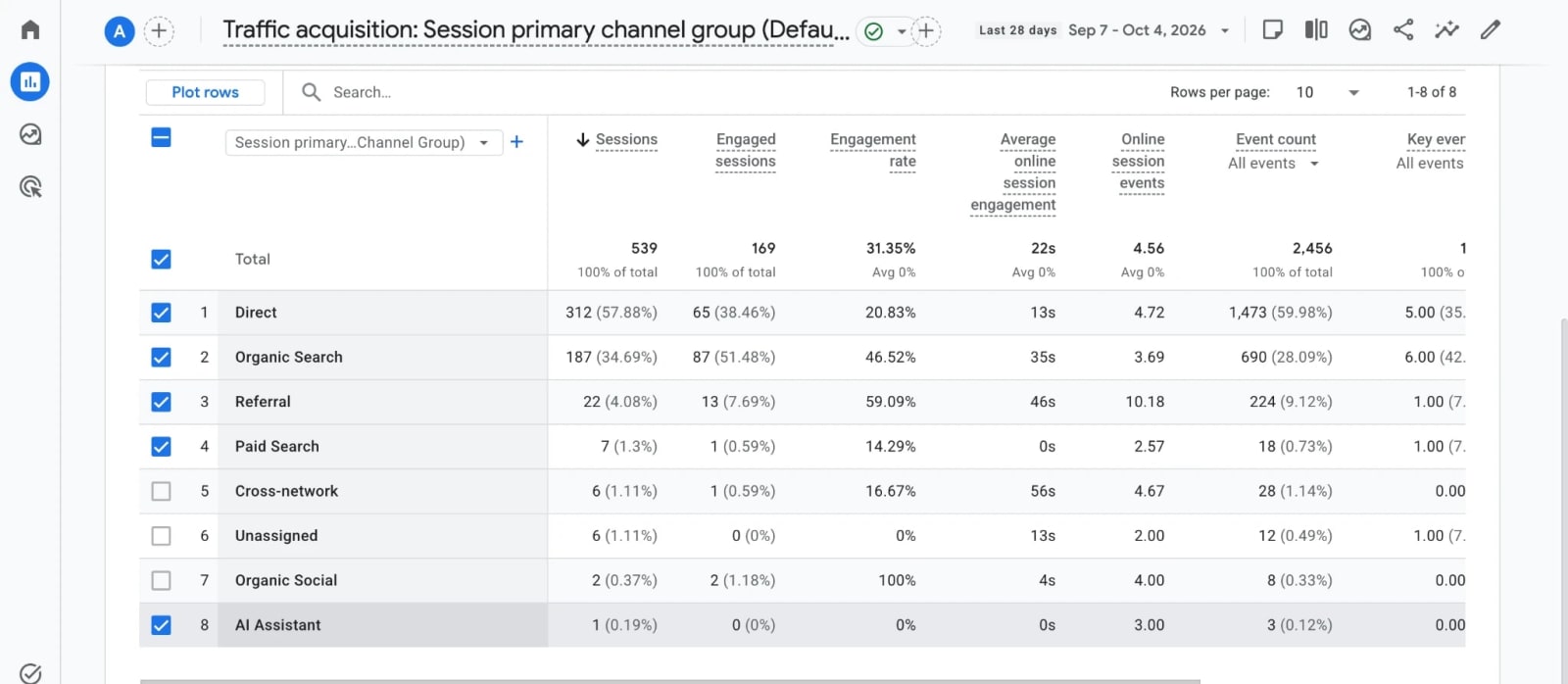
Step 1: Open the Traffic acquisition report. Go to Reports → Acquisition → Traffic acquisition. This report is session-based, so it includes returning users.
Step 2: Select Session source/medium. Change the primary dimension, then search for known AI sources:
Platform | Source to check |
|---|---|
ChatGPT | chatgpt.com |
Perplexity | perplexity.ai |
Gemini | gemini.google.com |
Claude | claude.ai |
Copilot | copilot.microsoft.com |
Don't assume every AI visit appears under these exact values. GA4 derives source from the referral and campaign data available, so recorded values can differ.
Step 3: Check landing pages. Add Page path and screen class as a secondary dimension to see which articles and service pages receive AI visits, which platform sends them, and whether several platforms cite the same URL.
Step 4: Measure engagement and conversions. The same report includes engagement rate, average engagement time, session key event rate, and revenue. The goal is to find which AI sources send qualified visitors, not simply the most sessions.
Why AI Traffic Can Appear as Direct
Not every AI click arrives with a usable referrer. When referral information is missing, GA4 classifies the session as (direct) / (none). Common causes include:
AI mobile apps that don't pass a referrer
In-app browsers and links that open outside the AI environment
Redirects or privacy and browser restrictions that strip referrer data
Visitors copying a URL instead of clicking the link
Research from Terminus found that a large share of AI assistant traffic arrives without a referrer, noting that assistant apps generally send none while Perplexity passes referral data more consistently.
Your GA4 numbers should therefore be read as measurable AI referrals, not total AI influence. Don't attribute every rise in direct traffic to AI. Instead:
Track identifiable AI sources separately.
Monitor direct traffic as a secondary signal.
Compare AI referral landing pages with pages getting unusual direct traffic.
Treat unidentified AI influence as unmeasured, not estimated without evidence.
How to Create an AI Referral Channel in GA4

GA4 now has a built-in AI Assistant channel, introduced in May 2026, which uses the ai-assistant medium when it detects a recognized AI referrer. Older guides that tell you to build one from scratch are outdated.
The native channel doesn't cover every platform. Google's documented sources include ChatGPT, Gemini, DeepSeek, Copilot, and Grok; others can remain under Referral. Check it first: go to Reports → Acquisition → Traffic acquisition, select Session default channel group, and look for AI Assistant.
To capture the rest, create a custom channel group under Admin → Data display → Channel groups → Create new channel group. Google recommends a regex match condition on source. For example:
^(claude\.ai|perplexity\.ai|www\.perplexity\.ai|meta\.ai|you\.com|poe\.com)$
Place the custom channel above Referral in the channel order, because GA4 assigns traffic to the first channel whose conditions match. Custom channel groups can be applied retroactively, but they aren't available in the BigQuery export schema.
Don't build the channel around every Google property. Google AI Overviews and AI Mode are part of Google's search experience and shouldn't automatically count as external AI referrals.
How to Increase AI Referral Traffic
The goal isn't to insert keywords for AI systems. It's to make important information easy to find, understand, cite, and verify.
Answer specific questions directly. Use clear H2/H3 headings, short definitions, and direct answers near the start of each section. Tables help for structured information.
Build topical depth. One article rarely establishes coverage of a subject. Build related content around a central topic and link the pages contextually. For AI search, that could mean supporting pieces on AI referral traffic, AI citations, content optimization, crawling and indexing, and brand mentions.
Add original information. First-party research, original statistics, survey results, expert commentary, and real examples give AI systems something more useful to surface than yet another summary.
Make claims easy to verify. Place the source next to the claim, not only at the end of the article.
Update pages when facts change. Refresh outdated statistics, pricing, screenshots, and platform features on pages that receive AI referrals. Don't change dates just to look fresh.
Strengthen your wider web presence. Consistent information across reputable third-party sites, publications, directories, and reviews makes your brand easier for AI platforms to understand.
Don't optimize solely for session volume. A page with 500 AI visits and no engagement may be worth less than one with 50 visits that produce qualified leads. Marketing Lad's SEO for lead generation guide covers turning organic visits into leads.
Analyzing the Results
Compare platforms. One platform may send most of your traffic while another sends fewer visits with a higher conversion rate. Report sessions, engagement rate, key events, and revenue for each.
Find your strongest pages. Group AI landing pages by type: blog posts, product pages, comparison pages, guides, research. If several platforms repeatedly send visitors to the same page, find out why. It may offer a clear answer, original data, or comprehensive coverage, and you can apply that to related content.
Track the trend monthly. A simple dashboard follows the path from AI sessions to engagement, key events, conversions, and revenue. Marketing Lad's SEO monitoring tools roundup covers platforms that track AI visibility by source. The most useful question isn't "How much AI traffic did we get?" but "Which platforms and pages generate visitors who take valuable actions?"
Common Tracking Mistakes
Treating all AI traffic as one channel. Platforms produce different visitor behavior.
Assuming direct traffic equals AI traffic. Typed URLs, bookmarks, and missing referrers also produce direct visits.
Measuring sessions without conversions. Volume alone doesn't show business value.
Ignoring landing pages. Knowing ChatGPT sent 500 visitors matters less than knowing which five pages received them.
Using outdated GA4 instructions. Check the native AI Assistant channel before building a custom one.
Assuming every mention creates a referral. Visibility and clicks are different measurements.
The rule: report what your analytics can verify, and don't turn assumptions about AI influence into measured traffic.
Bottom Line
Start by identifying AI sources in GA4, then track the pages they send visitors to and the actions those visitors take. Focus on three questions: which platforms send traffic, which pages attract it, and which visits generate leads or revenue. Use the answers to improve content that already earns AI referrals rather than creating separate content solely for AI platforms. Marketing Lad's best SEO AI tools roundup is a good starting point.
Frequently Asked Questions
Use Reports → Acquisition → Traffic acquisition with Session source/medium, then review landing pages, engagement, key events, and revenue. Also check the AI Assistant default channel.
It depends on the dataset and period. In DataDome's January–June 2026 data, ChatGPT accounted for 83.4% of measured AI-referred visits, ahead of Gemini (7.9%) and Perplexity (4.8%).
It depends on the dataset and period. In DataDome's January, June 2026 data, ChatGPT accounted for 83.4% of measured AI-referred visits, ahead of Gemini (7.9%) and Perplexity (4.8%).
No. AI search traffic broadly describes visibility or traffic from AI-powered search experiences, while AI referral traffic refers specifically to measurable visits arriving through AI platform links.